Table of Contents
What is PowerISO?
PowerISO is a popular tool for working with CD/DVD/BD disc images on Windows PCs. It lets you open, extract, burn, create, edit, compress, encrypt, split and convert ISO files (and many other image formats). Think of an ISO file like a digital copy of a CD or DVD – PowerISO can mount that image in a virtual drive, burn it to disc, or extract its files with a click. For many users, PowerISO is an all-in-one solution. PowerISO is all in one solution to deal with iso files.
Why Choose PowerISO?
PowerISO stands out because it handles almost all popular disc image formats (ISO, BIN, DAA, NRG, CDI, and more). It has an easy-to-use interface with drag-and-drop and context-menu integration, so beginners can pick it up quickly while tech-savvy users enjoy its advanced options. Key reasons to choose PowerISO include:
Versatility
It not only opens and extracts images, but also burns them to CD/DVD/Blu-ray, creates new images from files or discs, and converts between formats.
Bootable Media
You can make bootable USB drives or CDs/DVDs for installing an OS. For example, PowerISO can prepare a Windows installation USB in just a few clicks, How to make Bootable?.
Advanced Features
PowerISO supports DAA (Direct-Access-Archive), an advanced image format with built-in compression, password protection, and multi-volume splitting. It can compress or encrypt ISO files and even handle large disc projects.
Audio CD Tools
It burns audio CDs from MP3, FLAC, APE, WMA or BIN files, and it can rip audio CDs back into those formats, Learn to use.
Virtual Drives
PowerISO includes a virtual drive manager. You can mount any image file (ISO, BIN, etc.) as a virtual CD/DVD drive, giving instant access without burning a disc, Learn to use ISO mounter.
Integration & Updates
It integrates into Windows (right-click menus, shell integration) so everyday tasks are simple. Registered users get lifetime free updates, and there’s a 30-day money-back guarantee on the paid version.
PowerISO works well it makes everyday tasks easier and faster for virtual drives and iso files.
PowerISO will run on almost any PC. It supports both 32-bit and 64-bit Windows. It even support Windows 98. In short, if your PC runs Windows, it can run PowerISO.
PowerISO Free Version
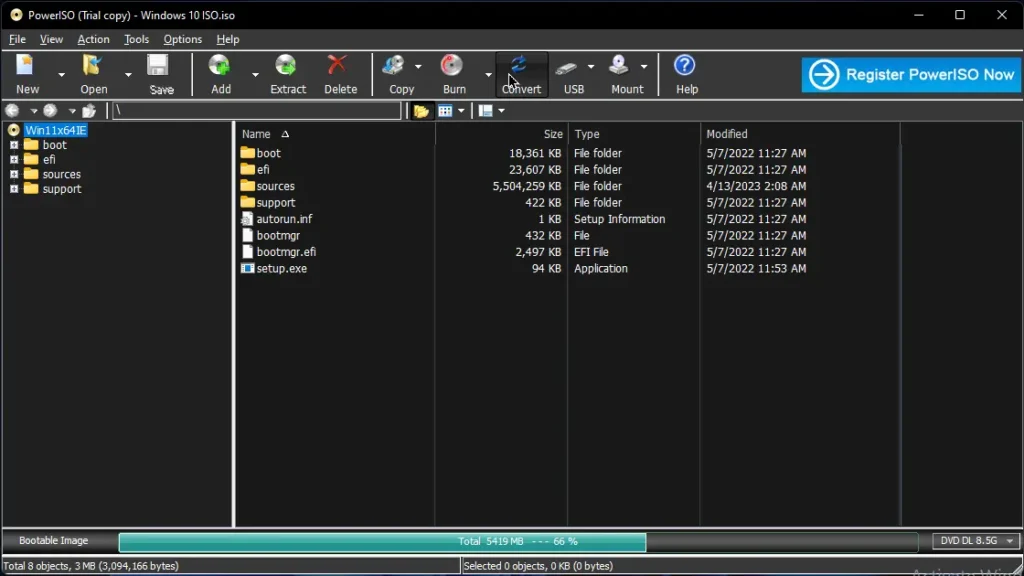
There is a free version available, you can download PowerISO to evaluate the software. All features (mounting images, burning, extracting, etc.) work the same in trial mode. In fact, you can test every capability with smaller files for free. If you just need basic image mounting or extraction of small ISO files, the trial might be enough for you.
The free version has a couple of limitations:
File Size Limit
Trial users cannot create or edit image files larger than 300 MB. Any ISO or DAA over 300 MB will be blocked.
Registration Prompt
The software will regularly remind you to register (it shows a “Register” dialog each time you use it).
Watermark
Some special features or discs may have a small watermark or nag message until registered.
PowerISO Premium Version
To remove the trial limitations, you must purchase the full version. The premium license costs $39.95/lifetime, also checkout here, for a single-user license. Once you pay (via PayPal, credit card, etc.), you immediately receive a registration code by email. Entering this code in PowerISO turns your copy into the permanent, full version.
Unlimited Image Size
Remove the 300 MB cap, so you can create or burn very large images.
No Nag Screens
The annoying “Register” dialog and any trial reminders will disappear.
Lifetime Free Updates
You’ll get free lifetime upgrades to new versions, so buying once keeps PowerISO up-to-date.
Free Email Support
Access to unlimited technical support via email: support@poweriso.com , and a 30-day money-back guarantee if you’re unsatisfied contact: sales@poweriso.com.
| Feature | Unregistered | Registered |
| Cost | Free | $39.95 |
| Max Image Size | 300 MB limit | Unlimited size |
| Registration Prompt | Yes | No |
| Updates | No | Yes |
| Email Support | None | Lifetime |
| Watermark | On some features | No watermarks |
| Features | All features (limits apply) | All features |
Key Features
Extensive Format Support
Handles nearly all CD/DVD/BD image types (ISO, BIN, DAA, NRG, CDI, etc.). You won’t need separate tools for each format.
Open & Extract
Double-click any ISO/DAA file to open it. Then extract files or folders with one click.
Burn to Disc
Burn an ISO or other image to CD, DVD or Blu-Ray. PowerISO can also create Audio CDs from MP3, FLAC, APE, WMA or BIN files. It supports creating Data CDs/DVDs and Video DVDs/VCDs as well.
Rip Audio CDs
Convert Audio CDs into MP3, FLAC, APE, WMA or BIN files for archiving or playback.
Create ISO
Build an ISO or BIN image from any files on your hard drive or from a physical CD/DVD/BD. This is handy for backing up discs or consolidating files.
Edit ISO
You can edit image files directly (add, delete, rename files inside an ISO) without having to extract everything first.
Virtual Drive
Mount images on a built-in virtual CD/DVD drive. After mounting, you can run programs or access files in the image as if a disc were inserted. You can mount multiple images in different virtual drives simultaneously.
Image Conversion
Convert between image formats (e.g. BIN to ISO). PowerISO can convert almost any supported format into a standard ISO.
Bootable Media
Create bootable USB drives for Windows installation. You can also make bootable CD/DVD discs or bootable ISO files for OS or utility CDs.
Check detail guide on: How to Make Bootable USB For Windows.
Compression & Encryption
Use the DAA format to compress large ISOs and password-protect them. You can also split an image into multiple smaller files for storage on floppy disks or USB sticks.
User-Friendly
PowerISO works in the background with shell integration. Right-click any supported file to see PowerISO commands (mount, burn, extract, etc.). It also remembers your UI settings and supports multiple languages.
These capabilities mean PowerISO can handle almost any optical disc task. Even if you’re a beginner, you’ll find its functions clear and powerful.
How to Download PowerISO for free
Getting PowerISO up and running is quick and easy. Follow these steps to download PowerISO and how you can install it on your Windows PC:
Step 1: Download PowerISO
- Go to the Download Link.
- Click on the download button to start downloading PowerISO.
Step 2: Extract and Run the Setup
- Right-click the file and select “Extract Here“. (You’ll need a tool like WinRAR or 7-Zip to extract it.)
- After extraction, run the PowerISO.exe file to install program.
- Done! You have successfully downloaded and installed PowerISO.
System Requirements
PowerISO is very lightweight and runs on any modern (and even older) Windows PC. Below are the official requirements:
- Windows: Supported(all versions).
- Processor: Intel Pentium 166 MHz or above.
- RAM: 64 MB RAM minimum.
- Graphics: not required.
- Hard Disk: ~10 MB free space.
- Sound Card: not required.
- Microphone: not required.
- Internet: not required.
Conclusion
PowerISO is a fast, lightweight, images mounter, burner and extracter tool. It has simple, beginner-friendly interface. It is free for minimal tasks. If you want full access of its features then you have to purchase a license, other wise you can use its free version. It has a lot of features combined multiple software functionalities, that makes it all-in-one and powerful solution for both technical and general users.
Setup Details
- Software Name: PowerISO
- Download File Size: ~15 MB
- Application Type: Free / Full Standalone Setup
- Compatibility: Both (32-bit and 64-bit)
- File Format: WinRAR File
- Password: theleanerz.com
Download PowerISO
Note: Password for all files is thelearnerz.com
By clicking this button your download will start automatically, after the countdown. Please click only once and wait for the application to begin downloading.
Download PowerISO
If you want to download PowerISO from Official site please visit @PowerISO.