Table of Contents
What is Smadav?
Smadav Antivirus is an Indonesian-made antivirus program designed as an extra second-layer protection for Windows PCs and USB flash drives. It is lightweight and can coexist with other antivirus software without causing conflicts. Smadav offers real-time scanning and automatic updates to help protect your system against the latest threats.
In this guide, we’ll cover Smadav’s key features, user interface, system requirements, and step-by-step instructions to download Smadav antivirus and install it on your computer.
Key Features of Smadav Antivirus
Smadav packs several useful features into a compact package. Key highlights include:
Second-Layer PC Protection
Smadav is built to complement (not replace) your main antivirus software. It uses behavior analysis and heuristics so it can run with other security tools, adding an extra security layer to catch threats that might slip past your primary AV.
USB Drive Security
A signature feature is Smadav’s focus on USB flash drives. It automatically scans any USB device you connect, catching hidden or unknown viruses even if they’re not in the virus database. It can also clean infected drives and restore hidden files on USB media, helping prevent malware spread from removable storage.
Real-Time Scanning & Updates
Smadav provides real-time protection by constantly monitoring your PC for suspicious activity. It also regularly updates its virus definitions automatically, ensuring up-to-date defenses against new malware. These features help keep your computer protected around the clock.
Quarantine Manager
If Smadav detects a possible threat, it moves the suspicious file into quarantine instead of deleting it immediately. This allows you to review or restore files later if needed, reducing the risk of losing important data by accident.
Lightweight and Low Resource Usage
Smadav is extremely small (under 10 MB installer) and designed to use minimal CPU and memory. In practice, it runs quietly in the background without slowing your PC. This makes it ideal for older or low-end systems, and lets you install another full antivirus alongside Smadav for maximum coverage.
Each feature works together to provide comprehensive protection without much impact on performance.
User Interface and Ease of Use
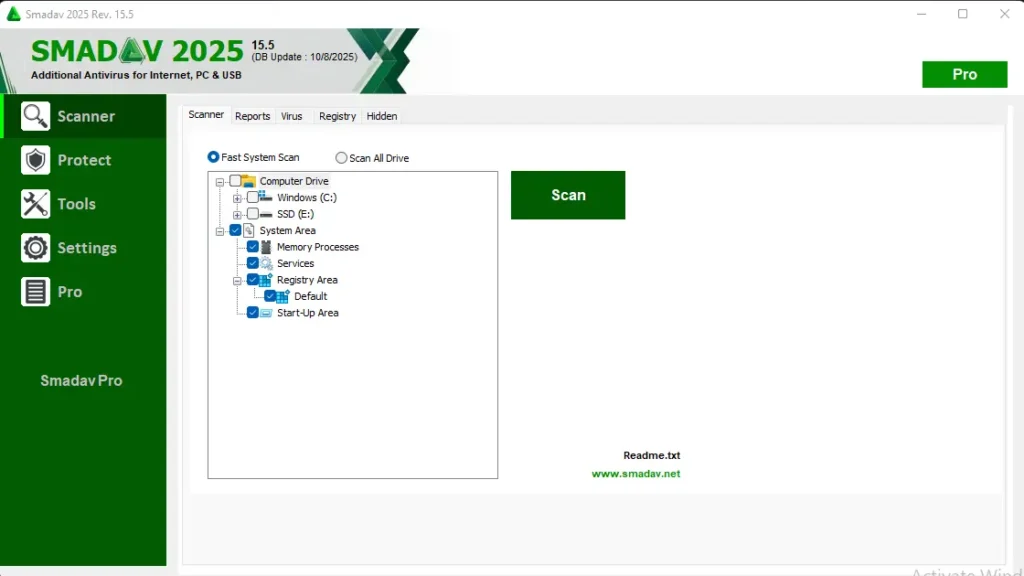
Smadav’s interface is simple and uncluttered, making it easy for both beginners and advanced users to navigate. The main dashboard shows basic status and lets you run quick or full scans with one click. All options are clearly labeled, and on-screen prompts guide you through tasks like scanning a USB drive or restoring files.
According to reviews, users find Smadav’s layout intuitive – you can turn on real-time protection, manage quarantined files, and check for updates in a few clicks. In short, Smadav’s clean design and helpful wizards ensure that even non-technical users can use Samdav Antivirus without any confusion.
Why Use Smadav Antivirus?
There are several reasons users can choose Smadav as part of their security setup. First, Smadav catch threats that might get past a single scanner. Its emphasis on USB protection is particularly valuable: it can detect hidden malware on flash drives and restore infected files that other antivirus might miss. Because Smadav uses very few resources, it won’t slow down your system even during full scans. In practice, it runs quietly in the background.
Additionally, Smadav Pro is a budget-friendly solution. There is a free version that provides all the essential protection (scanning, USB defense, etc.), which is great for casual users. You can also purchase Smadav Pro if you want to use its advance features see pricing below.
Paid upgrade adds things like advanced settings, theme customization, and removing upgrade prompts. Overall, Smadav Pro offers strong extra protection at very low cost, making it worth trying for anyone who wants safer USB usage and a second opinion for malware scans. Many users simply download Smadav for its USB protection and real-time scanning without slowing their system.
How to Download Smadav Pro Antivirus
Follow these simple steps to Download Smadav Antivirus on your Windows System:
Step 1: Download Samdav Antivirus
- Go to the Download Link.
- Click on the download button to start downloading Samdav Antivirus.
Step 2: Extract and Run the Setup
- Right-click the file and select “Extract Here“. (You’ll need a tool like WinRAR or 7-Zip to extract it.)
- After extraction, run the Smadav.exe file to install program.
- Done! You have successfully downloaded and installed Smadav.
Is Smadav Antivirus Free or Paid?
Smadav Free
Smadav comes in two editions: Free and Pro. The Free version includes all the core protection features – real-time scanning, USB virus defense, updates, and the basic cleaning tools. It even fixes some registry and hidden-file issues on infected systems. However, the free edition will show occasional messages reminding you about the Pro upgrade.
Smadav Pro
The Pro version adds extra settings. With Smadav Pro, you get features like hiding upgrade prompts, customizing the interface theme, setting an admin password, and accessing the advanced Tools section. It also allows commercial use (business licenses) if needed. The cost for Smadav Pro is very low – at the time of writing, one PC license is about $3.90/year.
Smadav System Requirements
Operating System
Smadav Antivirus is compatible with all Windows systems and has very low pc requirements. In fact, even older PCs can run Smadav smoothly. The installer itself is tiny (under 10 MB).
- Windows: Supported(all versions).
- Processor: Pentium-4, 1 Ghz.
- RAM: 512 MB.
- Graphics: not required.
- Hard Disk: 50 MB.
- Sound Card: not required.
- Microphone: not required.
- Internet: not required.
Conclusion
Smadav Antivirus is an effective, lightweight antivirus, that is not essential for pc but provides an extra layer of protection for Windows users. Its key benefits – USB flash drive scanning, real-time threat detection, and minimal system resource usage are the major factors thats why Smadav is slightly ahead than other antiviruses. Smadav’s simple interface and helpful tools make it easy to use. And since there’s a free version available, it’s risk-free to try. If you’re looking for extra USB security or a second-layer antivirus, you can download Smadav and get started in minutes. For more details visit @Smadav.
Setup Details
- Software Name: Smadav
- Download File Size: 4 MB
- Application Type: Free / Full Standalone Setup
- Compatibility: Both (32-bit and 64-bit)
- File Format: WinRAR File
- Password: theleanerz.com
Smadav Download Links
Note: Password for all files is thelearnerz.com
By clicking this button your download will start automatically, after the countdown. Please click only once and wait for the application to begin downloading.
Download SmadavIf you want to download Smadav from Official site please visit @Smadav.



thc gummies for calm daily stress management
what do you mean ?