Table of Contents
What is Typing Master Pro?
Typing Master Pro is a computer program that helps people learn and practice typing on a keyboard. It works like a teacher for typing it gives you small lessons, shows you which fingers to use, and provides exercises and games to improve your typing speed. In simple words “Typing Master Pro is software that trains you to type fast and accurate”.
If you’d like to skip the article and download the file directly: Go to the Download Link
User Interface and Ease of Use
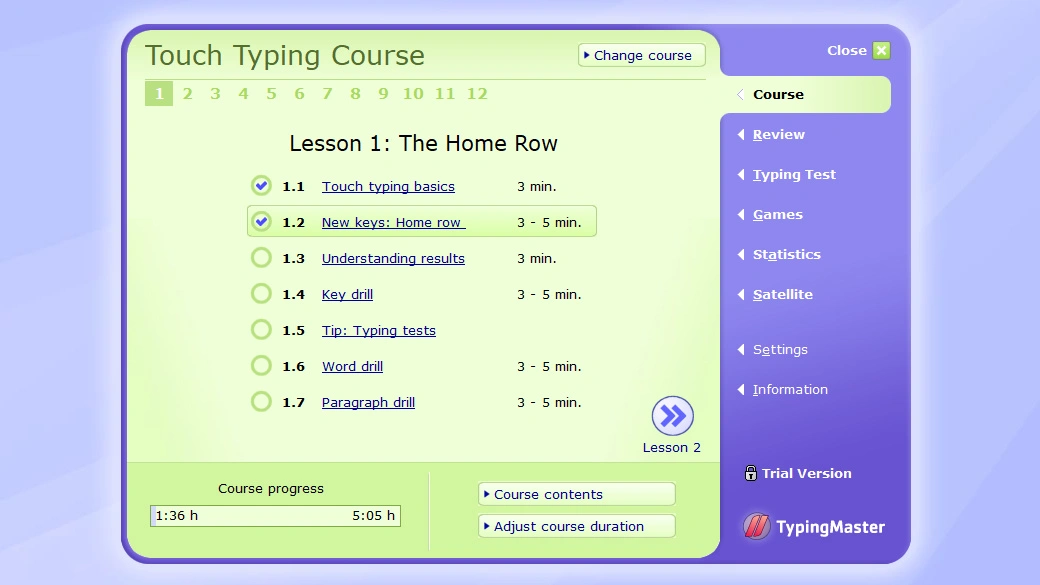
Typing Master Pro has a simple and user-friendly interface designed to help learners focus on improving their typing skills without distractions. The layout is clean, with clearly labeled menus, practice lessons, and progress tracking tools that are easy to navigate even for beginners. Its step by step guidance appears on the screen during exercises, so users can follow instructions effortlessly without needing prior experience.
The color scheme and design are kept minimalistic, ensuring that the main attention stays on the lessons and practice activities. Overall, the interface is intuitive and straightforward, making it accessible for both new learners and experienced users who want to refine their typing speed and accuracy.
Why Use Typing Master Pro?
Typing Master Pro is one of the best choices when it comes to learning and improving typing skills. It provides dedicated courses that cover every small detail needed to boost your typing speed. There are separate lessons for practicing numbers and special characters, along with fun typing games that keep the learning process engaging and enjoyable.
There are many advanced features that help you better understand your typing mistakes. With detailed lessons, interactive games, and intelligent tracking, Typing Master Pro provides everything you need to master typing while keeping the process interesting.
Adaptive Satellite Tracking
Its built in Typing Meter (Satellite) continuously monitors your typing on the PC and then generates custom exercises for your most troublesome keys. This means the software keeps you improving even outside the lessons by targeting your weak spots.
Typing Games
Typing Master Pro includes 4 built in typing games (such as Wordtris, Bubbles, Clouds and ABC) that turn practice into a game. These games make learning more enjoyable than just boring drills.
WordTris Typing Game

WordTris is a fun game in Typing Master Pro that helps you to practice your typing skills. In this game, the practice words start falling down the screen similar to the famous block game Tetris. You just have to quickly type the words before they reach the bottom.
Bubbles Typing Game

Bubbles Typing Game in Typing Master Pro turns your typing practice into a playful challenge. Small colorful bubbles rise on your screen each bubble carrying a unique and different letter. To keep practicing your typing, you just need to type what’s inside the bubble before it escapes out of the screen.
Clouds Typing Game

Clouds Typing in Typing Master Pro is a fun way to practice your typing while keeping your eyes on the screen. As you play, clouds move across the sky and each cloud has a special word inside it. Your challenge is to type those words before the clouds float off the screen.
ABC Typing Game

ABC Game in Typing Master Pro is one of the simplest practice games even if you are not friendly with it before. Within the game, letters of the alphabet appear on the screen, usually in alphabetical order (A, B, C, and so on). You just have to press the correct key on your keyboard as quickly and accurately as possible.
Comprehensive Courses
It offers five structured typing courses covering all key areas:

Comprehensive Courses are designed to give you complete training for your touch typing journey. The lessons start with the basics, helping you to get familiar with the keyboard layout and teaching you which fingers should go on which keys. Once you are familiar with that, the lessons move on to building your typing speed and accuracy so you can type faster and accurate without looking at the keyboard.
Lightweight & Offline
Typing Master Pro is lightweight and runs smoothly on your pc without slowing it down. You don’t need a powerful computer to use it. The most important thing is that it is completely offline which means once you’ve download and install it you don’t need any internet connection to practice your typing. Basically, it is lightweight, fast, user friendly and completely offline.
Detailed Progress Feedback
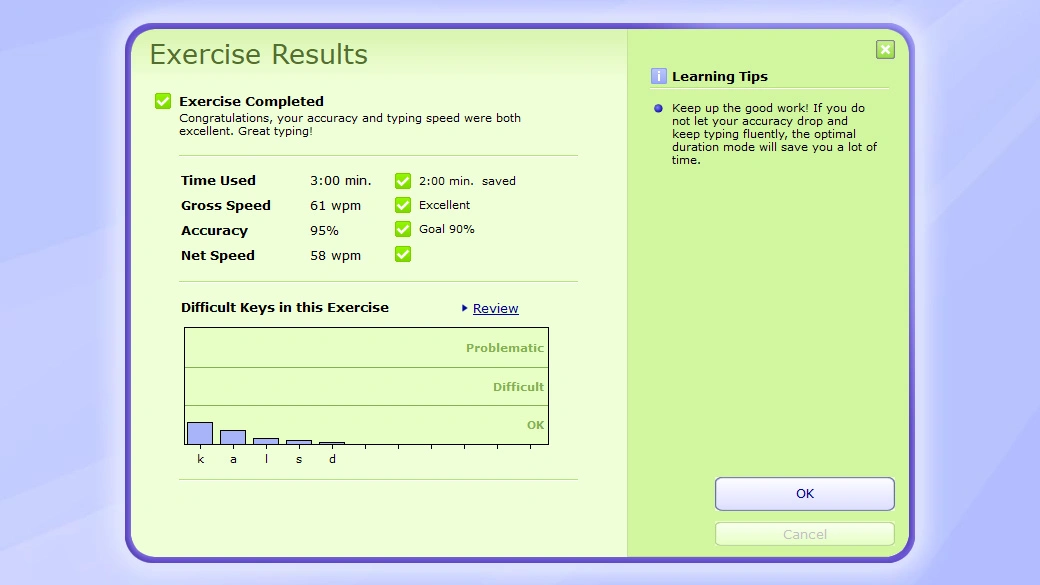
Monitoring your improvement is easy with Typing Master Pro. It provides typing tests and progress reports after each lesson. The built in tests record your words per minute and error count and then display advanced feedback.
According to the official info, it offers “professional typing tests” and “illustrated statistics” to follow your progress. You’ll see charts of your speed and accuracy over time, which helps you recognize trends and identify what to work on next. This statistical feedback, combined with the Smart Review system, ensures you know exactly how much you’re improving.
How to Download Typing Master Pro
To get started with Typing Master Pro on your PC, follow these steps:
Step 1: Download Typing Master Pro
- Go to the Download Link.
- Click on the download button to start downloading Typing Master Pro.
Step 2: Extract and Run the Setup
- Right click the file and select “Extract Here“. (You’ll need a tool like WinRAR or 7-Zip to extract it.)
- After extraction, run the Typing Master Pro.exe file to install program.
- Follow the on screen steps.
- Done! You have successfully downloaded and installed Typing Master Pro.
Is Typing Master 7 Free or Paid?
Typing Master 7 is not completely free software it offers a free trial (demo) mode and then requires purchase for full access. During the free trial, you can complete a limited number of lessons. For example, the trial version allows you to complete only two lessons. After that point, the rest of the program is locked unless you buy a license.
If you want to check pricing please visit: @Check_Pricing
System Requirements
Typing Master Pro is very lightweight. It can easily run on any pc with very low memory (RAM) and any processor that is equal to or higher than pentium 4.
Conclusion
If you want to improve your typing speed and accuracy, Typing Master Pro would be best option for you. It combines structured lessons with adaptive training, fun games, and detailed feedback. You can monitor your overall progress and improve your typing speed fast. Its clean and user friendly interface and advance features makes it best choice for both beginner and professional users. If you are looking for any software to learn touch typing or boost your typing performance, then Typing Master Pro will great fit for you.
Setup Details
- Software Name: Typing Master Pro
- Download File Size: 8.49 MB
- Application Type: Full Standalone Setup
- Compatibility: Windows (32/64-bit)
- File Format: WinRAR File
- Password: theleanerz.com
Download Links
Note: Password for all files is thelearnerz.com
By clicking this button your download will start automatically, after the countdown. Please click only once and wait for the application to begin downloading.
DownloadIf you want to download Typing Master Pro from Official site please visit @Typing Master Pro.