Table of Contents
What is WinRAR?
WinRAR is a powerful Windows-only archiving and compression software used by hundreds of millions users worldwide. It supports creating and opening RAR and ZIP archives (and many other formats) with high efficiency. Users can download WinRAR for free, its free version includes few limitations you can purchase it if you want full access. Its built in encryption makes it secure and also trusted by millions of peoples.
User Interface and Ease of Use
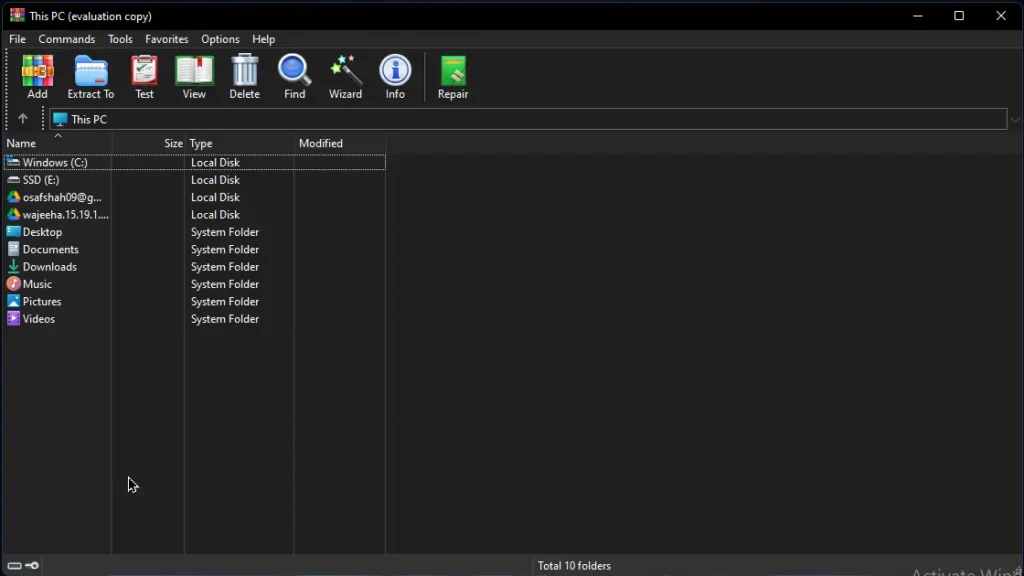
WinRAR’s interface is simple, clean and clear the makes it easy to use, even if you are don’t use WinRAR ever before you find it easy to navigate and explore its features and it feels like you are familiar with it already. Because it is UI as it is as “Windows”. We will walkthrough you to few of its features such as quick-access buttons for common tasks like Add, Extract, and Test. WinRAR also integrates seamlessly with Windows – you can drag and drop files onto the window or use the right-click context menu to zip files without opening the program. Overall, this balance of a simple UI plus powerful options makes WinRAR suitable for both beginners and advanced users.
Why Use WinRAR?
WinRAR offers several key advantages that make it a top choice for compression and archiving:
High Compression & Speed
WinRAR’s RAR format often creates smaller archives than standard ZIP, and its algorithms leverage multi-core CPUs to work quickly. By “consistently creating smaller archives, WinRAR is often faster than the competition,” which saves disk space and time.
Broad Format Support
Besides RAR and ZIP, WinRAR can unpack virtually all popular formats (CAB, ARJ, LZH, TAR, GZip, BZip2, ACE, ISO, 7z, and more). This means you can use one tool for most archive types you encounter.
Robust Security
WinRAR includes strong AES-256 encryption and digital signatures to secure archives. You can password-protect any archive with 256-bit encryption. Its authenticated signature technology also helps verify that archives haven’t been tampered with.
Advanced Archiving Features
WinRAR supports multi-volume (split) archives and self-extracting (SFX) archives. You can easily split a large archive into parts to fit on multiple disks. It is also “the only software that can create RAR archives” with features like recovery records and advanced compression modes.
Recovery and Reliability
WinRAR embeds CRC32 or BLAKE2 checksums for file integrity and includes recovery records to repair damaged archives. Even if part of an archive becomes corrupted, WinRAR can often reconstruct the original data.
Mature and Trusted
WinRAR has been in continuous development since 1995. Its widespread use and support mean it’s a tried-and-true solution. Over 500 million users across the globe rely on WinRAR for everyday archiving and backup.
Key Features
Efficient Compression
WinRAR uses a sophisticated compression algorithm (RAR5) that often yields smaller archive sizes than standard ZIP. The program automatically selects the best compression method for each file type (especially multimedia, executables, and libraries). It also supports multithreaded operation, so it can utilize multiple CPU cores to compress or decompress large archives quickly.When it comes to compression, extraction and archiving WinRAR’s delivering fast performance and high compression ratios makes it ahead of other compression softwares.
Compatibility
WinRAR can create RAR or ZIP archives, and it can unpack dozens of formats including 7z, ISO, GZ, TAR, ARJ, CAB, and many others. This means you can use WinRAR as a universal extractor for almost any archive you download or receive. The software is available in over 40 languages and fully supports Unicode file names, ensuring compatibility in all regions.
Strong Security
Security is built into WinRAR. You can set a password on an archive, using AES-256 bit encryption to guard its contents. WinRAR also supports adding a digital signature to archives to verify authenticity. These features give “peace of mind” when sending sensitive files over the internet, as only someone with the password can unpack the encrypted archive.
Multi-Volume & Self-Extracting Archives
WinRAR makes handling large files easy. You can split an archive into multiple volumes (e.g. to fit USB flash drives or CD/DVDs). It also supports creating self-extracting (SFX) archives – these are executable files that extract themselves without needing WinRAR installed. This is handy for sending compressed files to users who may not have WinRAR: they can simply double-click the SFX file to unpack it.
Data Recovery and Repair
WinRAR includes built-in recovery features. It can store recovery records in RAR archives to help rebuild damaged data if corruption occurs. The program can repair broken or incomplete archives (even those partially damaged on disk) by using these records. This reliability is valuable for archiving critical backups or transferring archives over unreliable channels.
How to Download WinRAR on Windows
Step 1: Download WinRAR
- Go to the Download Link.
- Click on the download button to start downloading WinRAR.
Step 2: Extract and Run the Setup
- Double-click the
WinRAR.exefile. - The popup will appear just click on “Extract” button.
- After extraction, open the folder and run
Setup.exe. - Done! You have successfully downloaded and installed WinRAR.
Is WinRAR Free or Paid?
WinRAR if free for general use with few limitations, if you want to use full of its features you need to purchase its license. The developer offers a trial for 40 days. So, you can test it in trial period before you buy. You can download WinRAR for free: go to download links.
During this trial, the software is fully functional with no hidden restrictions. After 40 days, WinRAR will begin showing reminder dialogs asking you to purchase a license. However, even without paying, you can still use WinRAR (the only difference is the reminder). Official license cost $29/lifetime.
System Requirements
Operating System
WinRAR is compatible with all Windows systems and has very low pc requirements. In fact, even older PCs can run WinRAR smoothly. The installer itself is tiny (under 10 MB).
- Windows: Supported(all versions).
- Processor: Pentium-4, 1 Ghz.
- RAM: 512 MB.
- Graphics: not required.
- Hard Disk: 50 MB.
- Sound Card: not required.
- Microphone: not required.
- Internet: not required.
Conclusion
WinRAR remains a reliable and versatile tool for all your archiving needs. It combines a simple, beginner-friendly interface with powerful features under the hood. Whether you need maximum compression, support for uncommon archive formats, or secure AES encryption, WinRAR delivers on all fronts. Its long track record, extensive language support, and built-in repair capabilities give users confidence that archives will stay safe and accessible. For users on Windows, WinRAR’s easy install and 40-day free trial let you experience these features at no cost. Overall, WinRAR is a top choice for compressing, encrypting, and managing files on any PC.
You can also check out other softwares @Check_Now.
Setup Details
- Software Full Name: WinRAR
- Download File Size: 10 MB
- Application Type: Free / Full Standalone Setup
- Compatibility: Both (32-bit and 64-bit)
- File Format: .exe
- Password: theleanerz.com
Winrar Download Links
Note: Password for all files is thelearnerz.com
By clicking this button your download will start automatically, after the countdown. Please click only once and wait for the application to begin downloading.
Download WinRARIf you want to download WinRAR from Official site please visit @WinRAR.